
The Metriweave guide
Your questions,
answered.
Help for your first dashboard, the details behind a chart, and the new ways to explore your history in 2.5. Search for a question or choose a topic below.
Looking ahead to 2.5: questions about new features are marked “Coming soon · 2.5.” Existing illustrated walkthroughs show 2.4.1 and use demonstration data.
No matching answers
Try a shorter phrase or another name for the measurement. You can also contact support.
Browse all 10 topics
Getting started
Choose the measurements you care about and make the dashboard your own.
What does Metriweave do?
Metriweave turns supported measurements already recorded in Apple Health into a dashboard, charts and longer-term views. You can follow changes in activity, sleep, heart measurements and other available data without opening each record individually.
It is a way to explore your recorded information—not a device that takes measurements, a diagnosis service or an emergency monitor. What you see depends on the records Apple Health makes available to Metriweave.
How do I get started?
- Open Metriweave and follow the Apple Health access prompts. Choose which supported measurements you want to make available.
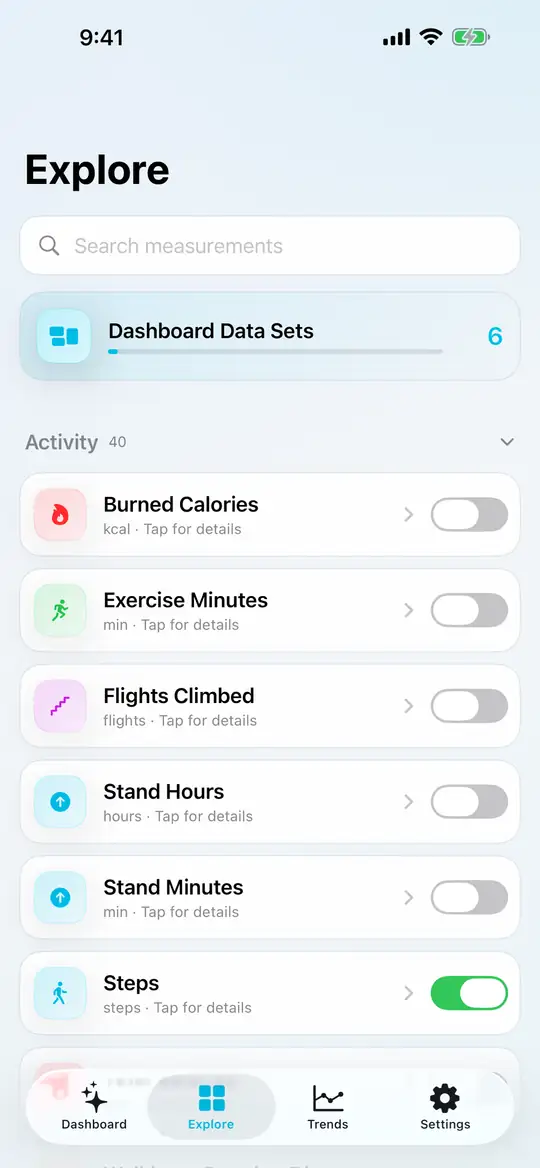
- Open Explore and switch on the measurements you want on your dashboard.
- Return to Dashboard, choose a time frame, and tap a card to explore its detail screen.
Free supports up to six dashboard cards and the current Day, Week and Month views. You do not need to create a Metriweave account.
How do I choose what appears on my dashboard?
Open Explore. Search for a measurement or browse the categories, then use its switch to add or remove it. In version 2.4.1, these switches change your dashboard immediately; there is no separate Save step.
Free supports six cards. Pro removes that limit. Choosing a card does not create readings for it—Apple Health must contain accessible data for the selected dates.
For a ready-made starting point, use Settings → Dashboard Presets.
Link to this answer: How do I choose what appears on my dashboard?
Which dashboard presets can I use?
Presets bring related measurements together. The available choices are:
- Everyday Wellness
- Walking
- Running
- Strength Training
- Cycling
- Swimming
- Adaptive & Accessible Movement
- Healthy Aging & Mobility
- Heart Health
- Cycle & Reproductive Health
- Perimenopause & Menopause
- Weight Management
- Sleep & Recovery
- Nutrition
- Diabetes Management
- Metabolic Health
Applying a preset replaces the current dashboard’s visible cards. Free uses up to the first six supported measurements in the preset; Pro can include more. Availability depends on the measurements supported by your software.
A preset organizes data. It does not diagnose a condition, set a medical target or generate missing readings.
Can I build a custom dashboard or rearrange my cards?PRO
With Pro, open Settings → Dashboard Presets → Custom Dashboard, choose measurements, then tap Apply. This replaces the current dashboard configuration; version 2.4.1 does not store multiple named dashboards. Named saved dashboards are coming in 2.5.
For card order and accent colors, open Settings → Dashboard Layout. Cards with available readings may be shown ahead of cards without data, so an empty card may not stay in its requested position.
You can still add or remove individual cards from Explore. Those changes take effect immediately.
Link to this answer: Can I build a custom dashboard or rearrange my cards?PRO
Can I change the units?
Yes. Open Settings → Appearance & Units and choose Automatic, Metric or Imperial. Automatic uses your region to choose the applicable unit preference.
Unit preferences are available in Free and Pro. Not every measurement has a metric/imperial alternative—for example, some clinical measurements use their own reporting units.
How is Metriweave different from Apple Health?
Apple Health stores the records shared by your devices, apps and connected providers. Metriweave gives you another way to explore supported records: put chosen measurements together, inspect charts, compare periods and focus on longer-term patterns.
You continue to manage the underlying records and app permissions through Apple Health.
Link to this answer: How is Metriweave different from Apple Health?
Can I use Metriweave if I am just starting to track my health?
Yes. Start with measurements already recorded by your iPhone or another source connected to Apple Health. A short history can still populate recent charts, while longer-term views need more recorded data.
You do not need to fill every dashboard card. Choose a few measurements you actually want to follow and add others as records become available.
Link to this answer: Can I use Metriweave if I am just starting to track my health?
Does removing a card delete its history?
No. Removing a card changes what appears on your dashboard. It does not delete its Apple Health records. You can add the measurement again in Explore and view the records that remain accessible.
Link to this answer: Does removing a card delete its history?
Health data & permissions
Find missing readings, understand sources and check what is being included.
Do I need an Apple Watch?
No. Metriweave reads supported records from Apple Health, which can receive data from your iPhone, compatible apps, connected devices or entries you make in Health.
An Apple Watch can provide additional measurements, but Metriweave does not require one. A measurement will only appear with values if an available source has recorded it and Health makes it accessible.
Why is a measurement empty or showing “No data returned”?
An empty view means Metriweave did not receive usable records for that measurement and period. It does not, by itself, tell us why.
- Open Apple Health and check whether that measurement has records.
- Check the dates in Metriweave. Older readings will not appear in a current-day chart.
- Review Metriweave’s access to that measurement in Health.
- If you use Pro source filtering, check that the source containing those readings is included.
- Open Metriweave again and refresh the data.
Apple does not reveal whether read access has been denied, so Metriweave cannot reliably distinguish denied access from an absence of records. Some measurements also depend on a particular device, software version or provider.
Link to this answer: Why is a measurement empty or showing “No data returned”?
How do I allow access to another measurement?
Open its detail screen in Metriweave and use Request Apple Health Access or Review Apple Health Access when that option appears.
You can also open Health → your profile → Apps → Metriweave to review access. The wording can vary with your operating-system version. Apple’s guide to managing Health data and app access explains the system controls.
Some cards need more than one underlying measurement. Blood Pressure, for example, needs both systolic and diastolic readings.
Link to this answer: How do I allow access to another measurement?
Can I choose which apps or devices contribute data?
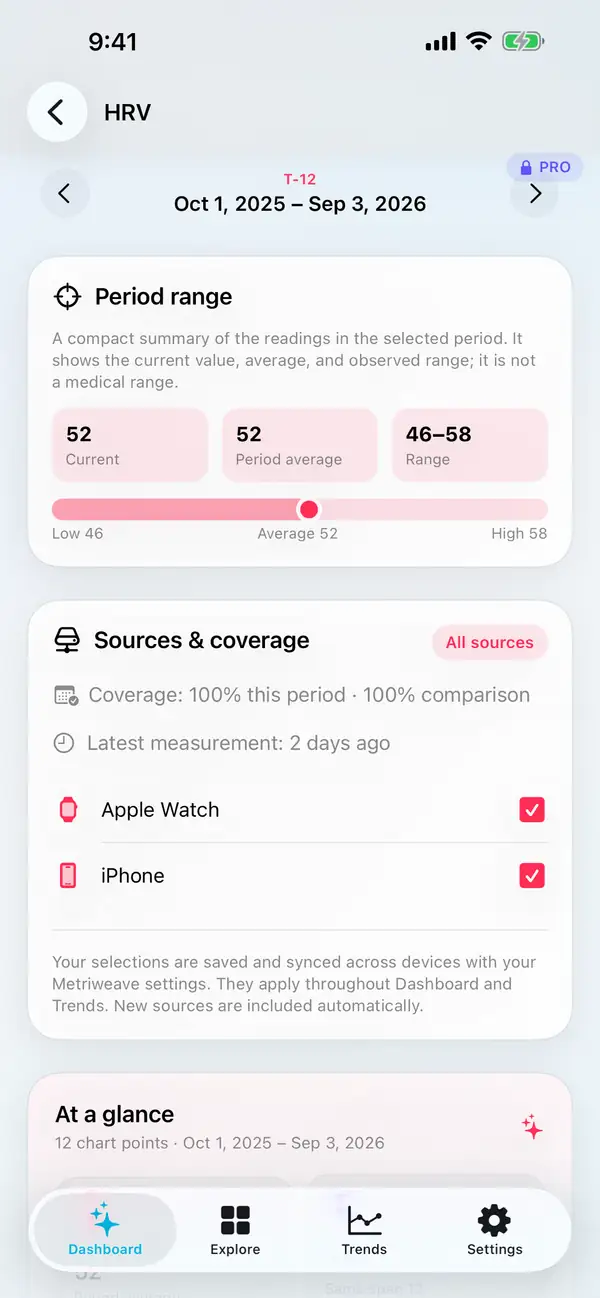
With Metriweave Pro, open a measurement’s detail screen and scroll to Sources & coverage. Use the source checkboxes to choose which records contribute to that measurement. The selection applies throughout Dashboard and Trends.
New sources are included automatically. Review this section after connecting another app or device if you want tighter control over what is included.
Free includes all available sources. If Pro ends, your saved exclusions are preserved but are not applied while you use Free.
Link to this answer: Can I choose which apps or devices contribute data?
Why is a value different from Apple Health or another app?
Start by comparing the same measurement, dates, units and sources. An app showing a full day, a different sleep-day boundary or a different set of sources may display a different result.
Also check what the number represents: a total, an average and a latest reading are not interchangeable. Longer time frames can group records differently from shorter ones.
Open Sources & coverage for contributing sources and any overlap notice. If the difference still looks wrong, contact support with the measurement, dates and steps to reproduce it. Do not send your full Health history.
Link to this answer: Why is a value different from Apple Health or another app?
What does “coverage” mean?
Coverage describes how many intervals in the selected chart period contain readings. It helps you judge whether the view is well populated or has gaps.
It is not a health score, the percentage of time you wore a device, or a guarantee that every possible reading has been collected. A measurement taken occasionally can have sparse coverage and still contain valid records.
Check coverage for both periods before interpreting a comparison. A large change alongside very different coverage deserves a closer look.
Why are my lab results or Health Records missing?
Clinical records must be available through Apple Health, and access to them is separate from ordinary activity and heart measurements. Availability depends on your device and Health setup, a supported connected provider, what that provider shares, and your permission choices.
First check that the records are visible in Health. Then review clinical-record access in Metriweave when offered. Metriweave does not independently sign in to your provider or retrieve records from its website.
Not every provider or record type is available. Connecting clinical records is optional; you can use the rest of Metriweave without them.
Link to this answer: Why are my lab results or Health Records missing?
Can Metriweave add, edit or delete my Health readings?
No. Metriweave uses read-only Health access. It does not take measurements or add, change or delete your Apple Health samples.
To correct an entry or manage its source, use Apple Health or the app or device that created it. Removing a dashboard card or resetting Metriweave does not delete the underlying Health records.
Link to this answer: Can Metriweave add, edit or delete my Health readings?
Can I use data from Garmin, Fitbit, Oura, WHOOP or another app or device?
Metriweave can read supported measurements that reach Apple Health and that you allow it to access. It does not connect directly to those companies’ accounts.
Check the source app’s current Apple Health sharing options. A device may share some measurements but keep others inside its own app. A score or reading visible only in that app will not automatically appear in Metriweave.
Link to this answer: Can I use data from Garmin, Fitbit, Oura, WHOOP or another app or device?
How do I connect a third-party source?
First enable Apple Health sharing in the source app, if it offers that option. Confirm that the expected records appear in Apple Health. Then allow Metriweave to read those measurements and choose dates containing the records.
Apple’s Health data guide explains app access. Metriweave does not need your password for the source app.
Can I mix Apple Watch, iPhone and third-party readings?
Yes, when they provide supported records through Apple Health. Open Sources & coverage to see which sources contributed. With Pro, you can include or exclude sources for a measurement.
Different devices may measure at different times or use different methods. Review source changes when comparing periods rather than assuming every reading is directly interchangeable.
Link to this answer: Can I mix Apple Watch, iPhone and third-party readings?
Will two devices recording the same thing double my totals?
Overlapping records need different handling depending on the measurement. Do not assume every chart simply adds all samples, or that every third-party duplicate can be recognized automatically.
If a total looks inflated, compare the dates and sources, check any overlap notice, and try a single source with Pro. Correct duplicate records in Apple Health or the app that created them. Metriweave does not delete duplicates from Health.
Link to this answer: Will two devices recording the same thing double my totals?
Can I view readings I entered manually in Apple Health?
Yes, if they use a measurement supported by Metriweave and you grant read access. Choose the dates you entered and check any source filters.
Enter or correct the reading in Apple Health; Metriweave does not provide a Health-record editor.
Link to this answer: Can I view readings I entered manually in Apple Health?
Why is my device’s readiness, stress or recovery score missing?
A score in another app is not necessarily a standard Apple Health measurement. Metriweave needs a supported record that the source actually shares with Health.
It may be possible to explore underlying measurements such as sleep or heart rate variability even when a device’s proprietary score is unavailable.
Link to this answer: Why is my device’s readiness, stress or recovery score missing?
Can Metriweave show data recorded before I installed it?
Yes. Installing Metriweave does not start a new Health history. It can read older supported records that are available on the device and permitted by your access settings.
Pro is required for earlier periods and longer-term views. Some source apps share only part of their historical data, so first check what is present in Apple Health.
Link to this answer: Can Metriweave show data recorded before I installed it?
Can I allow only some measurements or revoke access later?
Yes. Choose individual read permissions in Apple Health’s controls for Metriweave. You do not have to share every category or connect clinical records.
After access changes, refresh Metriweave. Removing permission can leave related charts empty; it does not remove the underlying readings from Apple Health.
Link to this answer: Can I allow only some measurements or revoke access later?
Charts, sleep & Trends
Know what a value represents before drawing a conclusion from it.
What is the difference between Day, Week, Month, Year and T-12?
Day, Week and Month let you examine shorter periods. Year shows a selected calendar year. T-12 shows eleven completed calendar months plus the current month so far, so it can cross a year boundary. It is not an exact rolling 365-day window.
Free includes the current Day, Week and Month. Pro adds Year, T-12, earlier periods and custom date ranges.
The grouping can change with the time frame. Read the labels for the selected measurement to see whether the values are totals, averages or individual readings.
Link to this answer: What is the difference between Day, Week, Month, Year and T-12?
How do I inspect a value on a chart?
On supported charts, tap or press and hold to inspect a recorded value and its date. Where available, use the chart-style control to choose Bar or Line. Specialized views, such as sleep stages and calendar displays, use layouts suited to those records.
If you use VoiceOver, focus the chart and use its available actions. Common metric charts offer Next reading, Previous reading and Clear selected value, so you do not need to target a small plotted point.
A blank position means no value is shown there. Do not assume it represents a zero reading.
What am I comparing when I turn on the previous period?PRO
Metriweave compares the selected period with the corresponding previous period. For a period still in progress, it uses the same elapsed portion of the prior period.
For example, a partly completed month is compared with the matching elapsed part of the previous month—not automatically with that entire month. T-12 comparisons shift the selected boundaries back twelve calendar months.
Check the displayed dates and coverage. A difference describes a change in recorded values; it does not explain why it happened or whether it is medically important.
Link to this answer: What am I comparing when I turn on the previous period?PRO
What do Overview, Patterns and Timeline show?PRO
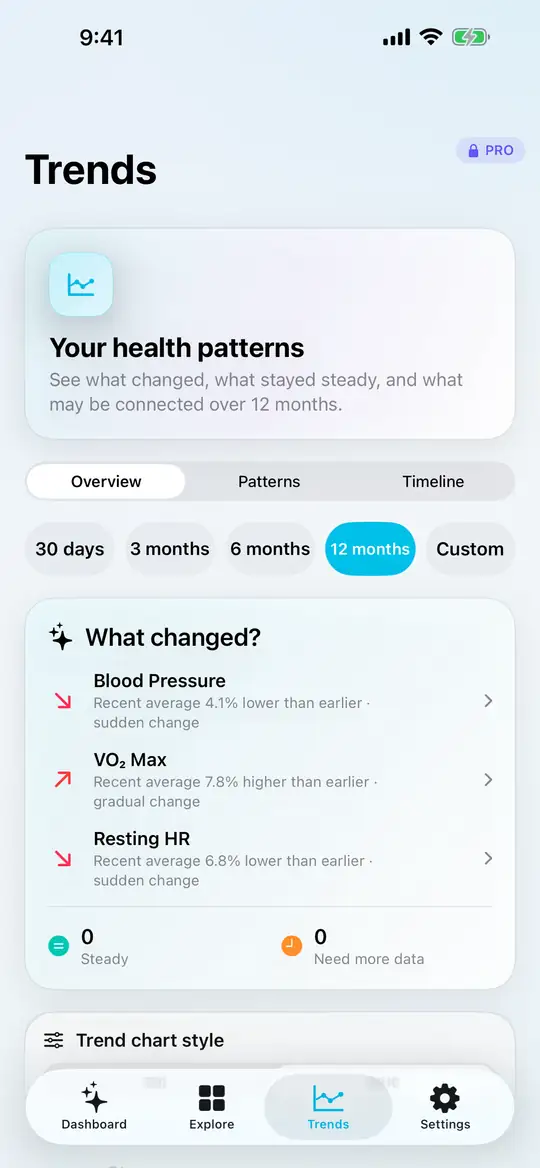
- Overview brings together notable changes, relatively steady measurements and measurements that need more data.
- Patterns lets you explore your personal baseline and supported relationships or repeating patterns.
- Timeline places detected changes in date order.
Trends uses the measurements selected for your dashboard. To include another measurement, add it in Explore.
Choose a period and open a measurement for context. Trends depends on the available recorded history; it may not have enough overlapping data to show every type of observation.
Link to this answer: What do Overview, Patterns and Timeline show?PRO
Is my personal baseline a “healthy” or normal range?PRO
No. Your personal baseline is calculated from your own recorded history. It describes what has been typical in that data, not what is medically recommended for you.
A value inside your baseline is not proof of good health, and a value outside it is not a diagnosis. A provider-supplied laboratory reference range is a different kind of information; Metriweave keeps those concepts separate.
Link to this answer: Is my personal baseline a “healthy” or normal range?PRO
What are “Unusual periods”? Are those explanations AI-generated?
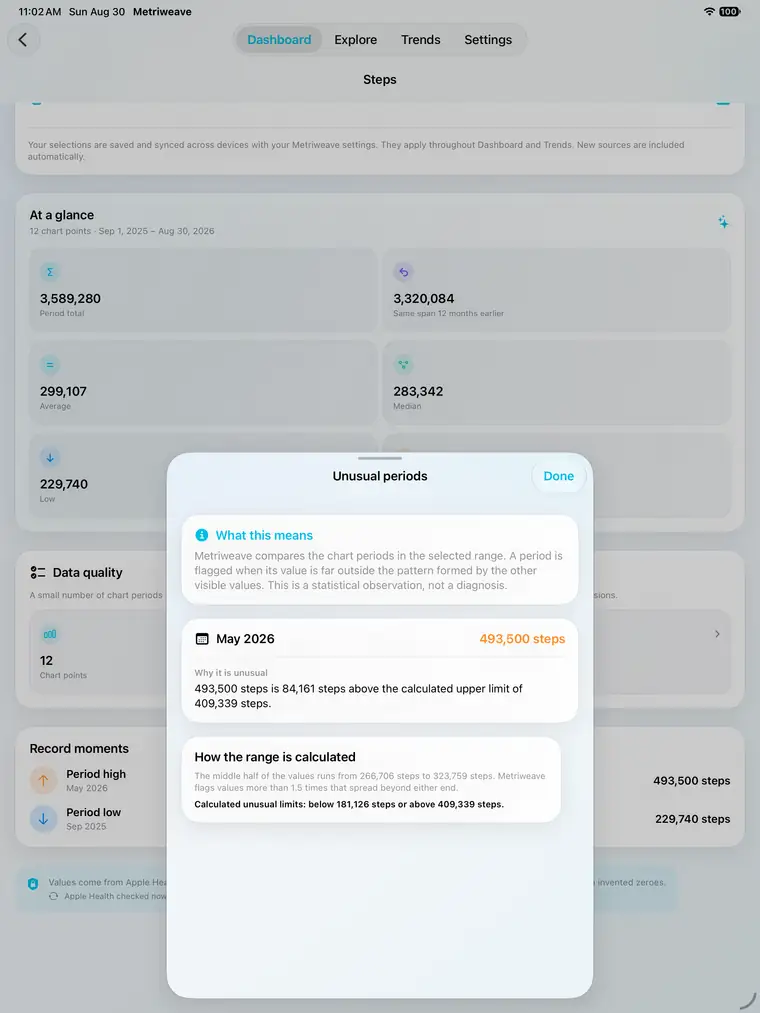
Unusual periods are chart values that fall well outside the statistical pattern of the other values in the selected range. The explanations come from a fixed calculation, not generative AI.
Open the measurement’s detail screen, then Data quality → Unusual periods, to review the flagged dates, values and calculation. The check needs at least four chart points and enough variation in the middle portion of the values to calculate a useful spread.
A flag is a prompt to inspect the data—not a diagnosis or proof that something is wrong. An activity change, sparse records or source differences may be worth checking, but the flag alone cannot tell you the cause.
Link to this answer: What are “Unusual periods”? Are those explanations AI-generated?
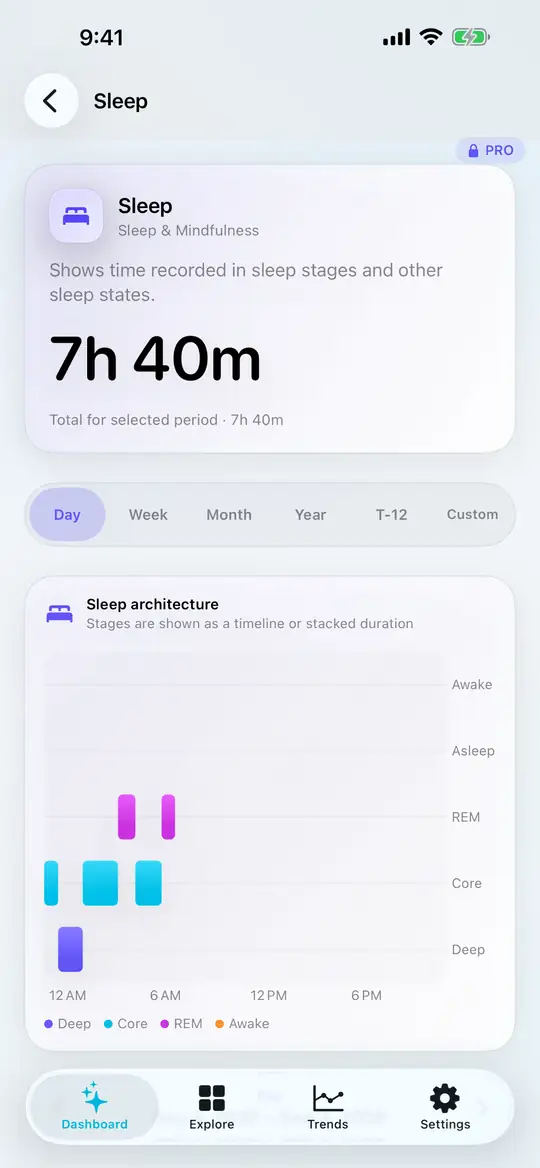
How should I read sleep totals, stages and averages?
In Day, sleep is grouped into a noon-to-noon sleep day. A typical overnight session is assigned to the date you woke up, rather than being split at midnight.
Week and Month show recorded-night totals. In Year and T-12, each month’s chart value is the average sleep per recorded night—not the total hours slept that month. Missing nights are not counted as zero sleep.
Where stage data is available, the sleep view distinguishes recorded stages such as REM, Core, Deep and Awake. Stage detail depends on what your sources provide and some specialized sleep views require Pro.
Non-overlapping naps and split sleep can also contribute. If a total is surprising, check the dates and selected sources before comparing it with another app.
Link to this answer: How should I read sleep totals, stages and averages?
Where do laboratory reference ranges come from?
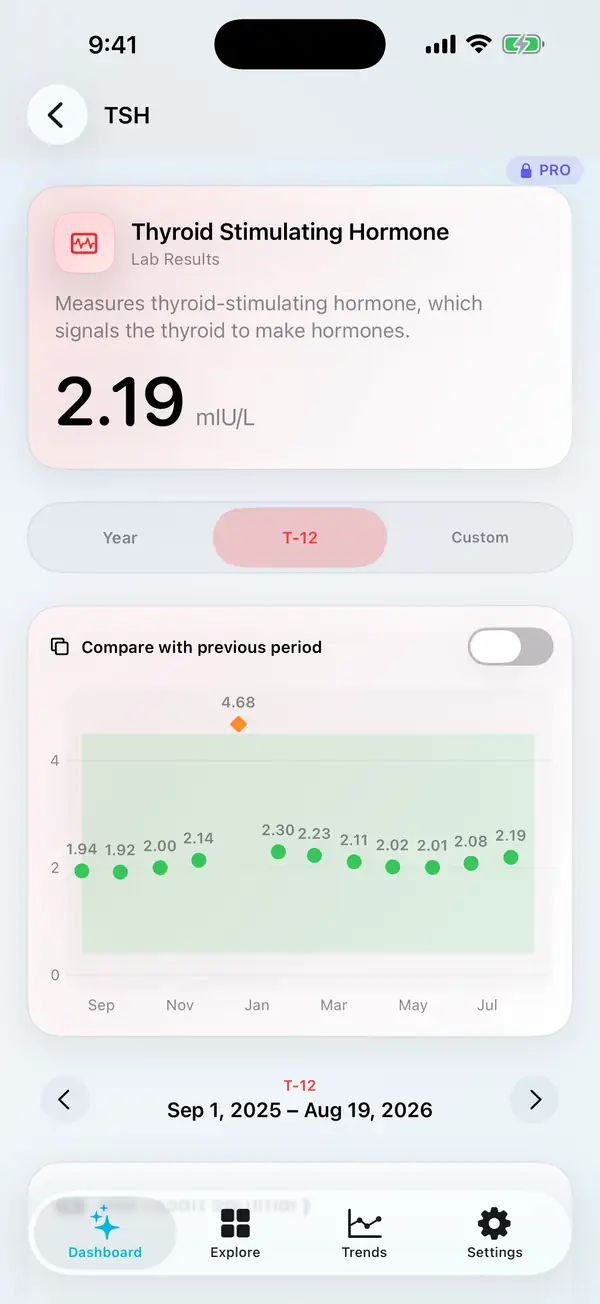
When a connected clinical record provides a reference range, Metriweave can display that provider-supplied information alongside supported laboratory results. It does not invent a reference range when one is missing.
Ranges and units can vary by laboratory, provider or result. A displayed range is not your personal baseline and should not be treated as individualized medical advice.
If you have a question about what a result means for you, discuss it with the clinician who ordered the test. The app can help you review the record, but cannot diagnose or recommend treatment.
Link to this answer: Where do laboratory reference ranges come from?
Does a blank calendar cell mean a symptom or event did not happen?
No. A blank cell means no corresponding record is available in that view. It is not the same as an explicit record that an event did not occur.
Calendar-style measurements depend on what was recorded in Health and what Metriweave can access. Check the underlying records if that distinction matters to your interpretation.
Link to this answer: Does a blank calendar cell mean a symptom or event did not happen?
Why do some cards show a total, others an average or a latest value?
The useful summary depends on the measurement. A step total answers a different question from an average heart rate or a latest lab result. Check the chart’s label, unit and selected period before comparing numbers.
Changing the time frame can also change how records are grouped. A monthly average is not the sum of the values displayed on a daily chart.
Link to this answer: Why do some cards show a total, others an average or a latest value?
Is missing data treated as zero?
A gap is not proof of a zero reading. For example, a night without sleep records is not automatically a night with zero hours of sleep.
Look at the chart’s coverage and available records before interpreting an average or comparison. Some measurements also distinguish an explicit “none” record from the absence of a record.
Why does today look lower than yesterday?
Today may still be in progress, and some sources sync later than others. Compare the elapsed time, available records and summary type before treating a lower number as a meaningful change.
For a clearer historical comparison, use completed periods where possible.
Link to this answer: Why does today look lower than yesterday?
Where can I find out what HRV, UACR or another abbreviation means?
Open the measurement’s detail screen and look for its name and description. An abbreviation can be unfamiliar even when the chart is clear.
In 2.5, Explain’s data context includes the metric’s full name and existing definition alongside its abbreviation, so you can ask about the measurement using either form. Explain has additional requirements.
Link to this answer: Where can I find out what HRV, UACR or another abbreviation means?
What’s new in 2.5
Coming soon: new ways to organize, compare and explore your recorded history.
How do I get the 2.5 features?Coming soon · 2.5
These features are coming in Metriweave 2.5. When the update is available in your storefront, install it from the App Store. Check the version installed on your device if a feature is missing.
The requirements vary by feature. Pro is needed for the advanced tools described below; only on-device explanations require Apple Intelligence and iOS or iPadOS 27 or later.
Link to this answer: How do I get the 2.5 features?Coming soon · 2.5
What are Saved Dashboards?Coming soon · 2.5
Your current dashboard remains saved. With Pro, 2.5 adds up to ten named dashboards, so you can keep different sets of measurements for different interests.
For example, keep a general wellness dashboard and another focused on sleep. These are views of your Health records, not separate copies of the data.
Link to this answer: What are Saved Dashboards?Coming soon · 2.5
Will my saved dashboards disappear if Pro expires?Coming soon · 2.5
No. Existing saved dashboards are retained if Pro ends. Free limits and feature restrictions apply, but the app does not delete your named dashboards because the subscription ended.
Link to this answer: Will my saved dashboards disappear if Pro expires?Coming soon · 2.5
What does Multi-metric Compare do?Coming soon · 2.5
With Pro, compare two to four measurements over the same periods. Each keeps its own unit and scale, so you can explore changes without treating unlike values as the same quantity.
The comparison is descriptive. Measurements moving together do not establish that one caused the other.
Link to this answer: What does Multi-metric Compare do?Coming soon · 2.5
Why do the lines in Compare have different scales?Coming soon · 2.5
Steps, hours of sleep and heart rate use different units and ranges. Keeping each measurement’s own scale makes the individual values readable.
Read each scale and unit before judging a line’s height or slope. Two lines meeting on screen does not mean their numerical values are equal.
Link to this answer: Why do the lines in Compare have different scales?Coming soon · 2.5
Can I choose exact dates and compare custom ranges?Coming soon · 2.5
With Pro, choose exact dates on Dashboard, Trends and metric charts, then compare them with another range. Review the date labels so you know which periods are being shown.
Different range lengths or amounts of recorded data can affect the comparison.
Link to this answer: Can I choose exact dates and compare custom ranges?Coming soon · 2.5
What is Daily Rhythm?Coming soon · 2.5
With Pro, Daily Rhythm helps you explore when readings were recorded during the day. You can use clock time or recorded sleep as the timing reference, with measurements that support detailed timing.
It can help you inspect a routine in your records. It does not prescribe a schedule or establish your biological circadian rhythm.
Why is a measurement unavailable in Daily Rhythm?Coming soon · 2.5
Daily Rhythm needs records that support meaningful timing detail. A measurement recorded only as an occasional value or broad summary may not support that view.
Sleep-relative exploration also depends on usable sleep records for the relevant dates.
Link to this answer: Why is a measurement unavailable in Daily Rhythm?Coming soon · 2.5
What are Health Chapters?Coming soon · 2.5
With Pro, Health Chapters identifies sustained periods in your recorded values. Open a chapter to inspect its dates, coverage and gaps.
A chapter describes a stretch of data. It is not a diagnosis or a claim that a specific life event caused the change.
Link to this answer: What are Health Chapters?Coming soon · 2.5
What can I do with Pattern Search?Coming soon · 2.5
With Pro, build and save questions that find matching dates across measurements. Review a saved question before running it again so its conditions still match what you want to explore.
Matches depend on the records available for the selected measurements and dates. No match is not proof that an event never happened.
Link to this answer: What can I do with Pattern Search?Coming soon · 2.5
What does Personal Seasons compare?Coming soon · 2.5
With Pro, compare the same months across years. You can use completed months or matching elapsed days, with missing records and source changes visible.
This helps you explore recurring patterns in your own history. It does not predict what will happen next season.
Link to this answer: What does Personal Seasons compare?Coming soon · 2.5
What is Your Metriweave Brief?Coming soon · 2.5
The Brief follows your dashboard period and selects a small set of observations using recorded-data coverage, persistence, personal patterns and equivalent-period comparisons. Open an observation to inspect its supporting chart.
It does not label a change as good or bad. Its observations come from the app’s data analysis; they are not free-form Apple Intelligence responses.
Link to this answer: What is Your Metriweave Brief?Coming soon · 2.5
Why is my Brief short or showing no observation?Coming soon · 2.5
The Brief is selective. There may not be enough usable history or coverage for a supported observation in the chosen period.
A quiet Brief is not a health assessment. You can still inspect the charts and choose another period.
Link to this answer: Why is my Brief short or showing no observation?Coming soon · 2.5
What are Life Events, and do they change my trends?Coming soon · 2.5
Add context such as travel, illness or a routine change. Life Events can appear on relevant charts so you can review the dates alongside your readings.
They do not alter the underlying Health records or change the trend calculations. An event appearing near a change does not establish cause and effect.
Link to this answer: What are Life Events, and do they change my trends?Coming soon · 2.5
Explain AI
Coming soon: questions about your displayed data, answered on a compatible device.
What do I need to use Explain AI?Coming soon · 2.5
You need Metriweave 2.5, Pro, and a compatible device running iOS or iPadOS 27 or later. Apple Intelligence must be enabled and ready, and the on-device model must support the language you are using.
Enable on-device explanations in Metriweave’s Settings as well. Buying Pro does not override Apple’s device or language requirements.
Link to this answer: What do I need to use Explain AI?Coming soon · 2.5
Why can’t I see the Explain AI button?Coming soon · 2.5
Explain is only shown when the app can establish that the operating system, device and language support the feature. Update to 2.5 when available, check your system version and review Apple Intelligence availability.
The rest of Metriweave can be used without Apple Intelligence, subject to the usual Free and Pro requirements.
Link to this answer: Why can’t I see the Explain AI button?Coming soon · 2.5
Why is Explain AI greyed out?Coming soon · 2.5
On an eligible device, Explain remains visible when Apple Intelligence is switched off or its model is still preparing. Tap the dimmed button to see what needs attention.
If Apple Intelligence is off, enable it in device Settings. If it is downloading or preparing, allow that process to finish before trying again.
Link to this answer: Why is Explain AI greyed out?Coming soon · 2.5
Where do I enable Apple Intelligence?Coming soon · 2.5
Open your device’s Settings and look for Apple Intelligence & Siri. Follow the setup shown for your device, then wait for the model to be ready.
Apple’s Apple Intelligence setup guide covers system availability and setup. Metriweave’s Explain feature additionally requires iOS or iPadOS 27 or later.
Link to this answer: Where do I enable Apple Intelligence?Coming soon · 2.5
Will Explain work on newly released compatible devices?Coming soon · 2.5
Metriweave asks Apple’s on-device model whether it is available. It does not rely on a fixed list of device model names.
A new device still needs the required operating system, a supported language, Pro, and Apple Intelligence enabled and ready. A product announcement alone does not confirm that setup is complete.
Link to this answer: Will Explain work on newly released compatible devices?Coming soon · 2.5
What information does Metriweave give Apple Intelligence?Coming soon · 2.5
Explain starts with context for the screen you are viewing: the measurement’s full name, abbreviation and existing definition, the displayed dates and units, and relevant values, coverage and source information.
Relevant displayed Life Events can include their type, dates and optional note. Your question and conversation provide additional context. It is not an automatic upload of your entire Health history.
Link to this answer: What information does Metriweave give Apple Intelligence?Coming soon · 2.5
Does Explain receive my actual readings or just a written summary?Coming soon · 2.5
It receives the relevant numerical data for the displayed view with labels explaining the dates, units and measurement. For example, a trailing 12-month view can provide each displayed month’s value.
Those chart values may already be totals or averages for their periods. They are not necessarily every individual sensor sample in Apple Health.
Can I ask about a measurement that is not on the current chart?Coming soon · 2.5
Yes. Explain can recognize a request for another supported measurement and add its available data for the displayed dates, provided Metriweave already has the necessary Health access.
It adds one additional measurement per question. The conversation does not bypass permissions or silently request access to a new Health category. If data is missing, review that measurement’s access and records outside the chat.
What kinds of questions can I ask?Coming soon · 2.5
Try a question tied to the chart, such as:
- “What does this measurement mean?”
- “Which months have the highest and lowest values?”
- “How does this month compare with the previous one?”
- “Are there gaps that make this comparison less useful?”
- “Can you also look at my sleep for these dates?”
You can ask follow-up questions in ordinary language. Check numerical claims against the chart, especially when a response calculates or interprets a difference.
Link to this answer: What kinds of questions can I ask?Coming soon · 2.5
Can Explain give a wrong answer?Coming soon · 2.5
Yes. Apple Intelligence can misunderstand a question, calculate incorrectly or draw an unsupported conclusion even when the supplied data is accurate.
Use the chart and underlying records to check the answer. Ask a clearer follow-up if helpful, and do not use an AI reply as a diagnosis, treatment recommendation or substitute for professional care.
Link to this answer: Can Explain give a wrong answer?Coming soon · 2.5
Why did Explain refuse my question or fail to answer?Coming soon · 2.5
Apple’s model may decline a request under its guardrails, or generation may fail because the model is unavailable or cannot complete the response. A failure does not by itself indicate a problem with your readings.
Check the message shown, confirm Apple Intelligence is ready, and try a shorter question about the displayed data. Metriweave cannot guarantee an answer to every question.
Link to this answer: Why did Explain refuse my question or fail to answer?Coming soon · 2.5
Is Explain using ChatGPT or sending my data to an AI website?Coming soon · 2.5
No. Explain uses Apple’s on-device model through the Foundation Models framework. It does not send the conversation or Health context to ChatGPT, Boxcue or a third-party AI server for generation.
Other Apple Intelligence features you use elsewhere on the device can have different behavior. This answer describes Metriweave’s Explain feature.
Link to this answer: Is Explain using ChatGPT or sending my data to an AI website?Coming soon · 2.5
Does Explain support every language in Metriweave?Coming soon · 2.5
Not necessarily. The app’s translated interface and Apple’s on-device language support are separate. Explain checks whether Apple’s model supports the app language in use.
A translated Metriweave screen does not guarantee that Explain is available in that language.
Link to this answer: Does Explain support every language in Metriweave?Coming soon · 2.5
Can I turn Explain off and keep using the app?Coming soon · 2.5
Yes. You can turn off on-device explanations in Metriweave’s Settings. Dashboards, charts and other features do not require an Explain conversation.
Your Pro access to other features remains subject to the same plan and data requirements.
Link to this answer: Can I turn Explain off and keep using the app?Coming soon · 2.5
Health Reports
Coming soon: build a private PDF from the measurements and dates you choose.
What can I include in a Health Report?Coming soon · 2.5
With Pro, choose measurements, graph dates, detailed-data dates, sources and layout. Prepare a PDF on device, then preview, print or save the finished report.
The report uses the supported records available to Metriweave. It does not retrieve records directly from a provider portal or invent missing values.
Link to this answer: What can I include in a Health Report?Coming soon · 2.5
Why do reports have separate graph and detailed-data dates?Coming soon · 2.5
A graph can show a longer history while the detailed-data section focuses on a shorter period. For example, show a year of context and include detailed records for a recent month.
Review both date selections before creating the PDF; they do not have to cover the same period.
Link to this answer: Why do reports have separate graph and detailed-data dates?Coming soon · 2.5
Can I choose which sources appear in my report?Coming soon · 2.5
Yes. Review the report’s source choices before generating it, particularly if more than one app or device records a measurement.
Source selection affects the records included in that report. It does not delete or edit records in Apple Health.
Link to this answer: Can I choose which sources appear in my report?Coming soon · 2.5
Can I bring a report to a medical appointment?Coming soon · 2.5
Yes. Preview it, check the measurements and dates, then print or share it using the available system options. You choose who receives it.
A report can help you discuss your recorded history. It is not a clinical interpretation, and Metriweave does not automatically send it to your healthcare provider.
Link to this answer: Can I bring a report to a medical appointment?Coming soon · 2.5
Can a report include lab results?Coming soon · 2.5
Supported laboratory measurements can be included when their records are available through Apple Health and you have granted the necessary access. Provider reference information depends on what the record contains.
Check the preview for the intended results, dates and units before sharing it.
Link to this answer: Can a report include lab results?Coming soon · 2.5
Why is a measurement or date missing from my report?Coming soon · 2.5
Check the measurement selection, both date ranges, source choices and Apple Health access. A graph and the detailed-data section may intentionally cover different dates.
If a result is also missing from its chart in the app, start with the missing-data checks. A report cannot include a record the app cannot access.
Link to this answer: Why is a measurement or date missing from my report?Coming soon · 2.5
What should I do if a report is too large or fails to finish?Coming soon · 2.5
Try fewer measurements or a shorter detailed-data range, then generate it again. You can keep a broader graph range for context while reducing the number of detailed records.
Check available device storage and the error shown. If the problem repeats, contact support with the selected options and app version; you do not need to send the report’s private contents.
Link to this answer: What should I do if a report is too large or fails to finish?Coming soon · 2.5
Does a saved PDF update when new readings arrive?Coming soon · 2.5
No. A generated PDF is a snapshot of the records and options used at creation. Generate a new report if you need later readings or corrected data.
Link to this answer: Does a saved PDF update when new readings arrive?Coming soon · 2.5
Can I export a spreadsheet or my whole Apple Health database?Coming soon · 2.5
Health Reports in 2.5 produce PDFs. They are not a CSV or spreadsheet export, or a full Apple Health database backup.
Choose a PDF report when you want a readable document with selected measurements, graphs and details.
Link to this answer: Can I export a spreadsheet or my whole Apple Health database?Coming soon · 2.5
Does deleting a PDF delete my Health data?Coming soon · 2.5
No. A saved report is a separate document. Deleting that file does not remove the original Apple Health records.
If you shared copies, removing your own copy does not delete copies held by recipients or other storage services.
Link to this answer: Does deleting a PDF delete my Health data?Coming soon · 2.5
Free & Metriweave Pro
What is included, what unlocks with Pro and where to manage purchases.
What can I use for free?
Free includes up to six dashboard cards, the current Day, Week and Month views, and the small Home Screen widget.
You can choose measurements in Explore, use unit preferences, follow your device’s System appearance, and turn on Enhanced chart contrast. Free includes all available data sources rather than individual source filtering.
Some specialized views require Pro. The app identifies features that are locked before you purchase.
What does Metriweave Pro add?
Pro adds unlimited dashboard measurements, Year and T-12 views, earlier periods and custom dates, comparisons and Trends, source filters, additional widgets, Apple Watch features, and more layout and appearance choices.
Coming soon in 2.5: up to ten named saved dashboards, Multi-metric Compare, Health Reports, Daily Rhythm, Health Chapters, Pattern Search and Personal Seasons. On-device explanations also require a compatible device running iOS or iPadOS 27 or later, with Apple Intelligence enabled and ready.
Pro does not create measurements your devices or apps have not recorded, or unlock provider records that are unavailable through Apple Health.
Is Pro a subscription? Is there a trial?
Current US offers, checked September 8, 2026:
- Monthly: $3.99/month after a 1-week free trial for eligible subscribers.
- Annual: $14.99 for the first year, then $29.99/year for eligible subscribers.
- Lifetime: $69.99 as a one-time purchase.
The annual offer is a discounted paid first year, not a free trial. Monthly and annual plans renew automatically unless canceled. Lifetime has no recurring renewal.
Offers depend on App Store eligibility and availability. Prices and currencies can vary by country or region. Review the price, introductory terms and renewal terms in Apple’s purchase confirmation before buying.
Link to this answer: Is Pro a subscription? Is there a trial?
I already bought Pro. How do I restore it?
Open Metriweave → Settings → Restore Purchases. Use the Apple Account associated with the purchase and allow the App Store to complete the restore.
If Pro still does not appear, check that the purchase or subscription is active in your Apple purchase information. Then contact support with the plan type and what the restore screen says. Do not send payment-card details or your Apple Account password.
Link to this answer: I already bought Pro. How do I restore it?
How do I manage my subscription, and what happens if Pro ends?
For an active subscription, open Metriweave → Settings → Manage Subscription to use Apple’s subscription-management screen. Review the renewal or expiration date shown there.
If Pro ends, the app returns to Free limits. Pro-only controls and views become unavailable. Saved source exclusions are preserved but inactive, so Free includes all available sources.
Ending Pro does not delete your Apple Health records. A lifetime purchase is not recurring, so it does not have a subscription renewal to cancel.
Link to this answer: How do I manage my subscription, and what happens if Pro ends?
Is the $14.99 annual offer the price every year?
No. The current eligible US introductory offer is $14.99 for the first year, then $29.99/year. The first year is paid up front.
Confirm the terms shown by the App Store for your account. An introductory offer is not a promise that an existing subscription’s renewal price changes.
Link to this answer: Is the $14.99 annual offer the price every year?
How does the monthly free trial work?
Eligible subscribers can start the monthly plan with a 1-week free trial. It then renews at $3.99/month under the current US terms unless canceled.
Apple confirms eligibility and the renewal date. Follow Apple’s subscription cancellation guidance if you do not want the plan to renew; do not rely on deleting the app.
Why does my device show a different price or no introductory offer?
The App Store determines prices and offer eligibility for your storefront and Apple Account. Currency, country or region, prior introductory offers and an existing subscription can affect what is shown.
Use the terms in Apple’s purchase confirmation. If they do not match what you expect, stop before confirming and contact support with the plan and displayed price. Do not include payment details.
Link to this answer: Why does my device show a different price or no introductory offer?
Do I need to buy Pro separately for my iPhone and iPad?
Use the Apple Account that owns the Metriweave purchase and try Settings → Restore Purchases on the other device. A restored purchase does not copy Health data or permissions; configure those separately on each device.
Link to this answer: Do I need to buy Pro separately for my iPhone and iPad?
How do I request a refund?
Apple handles App Store billing and refund decisions. Use Apple’s refund request instructions for the purchase.
Contact Metriweave support for help with an app problem, but we cannot promise Apple will approve a refund.
Will I need to buy Pro again for the 2.5 features?
The 2.5 features described here use Metriweave Pro. An active Pro subscription or recognized lifetime purchase provides Pro access; there is no separate 2.5 feature purchase.
Hardware, software, language and data requirements still apply. In particular, Pro alone does not make a device compatible with Explain AI.
Link to this answer: Will I need to buy Pro again for the 2.5 features?
Devices, widgets & languages
Use the right view on iPhone, iPad and Apple Watch.
Which devices and software versions are supported?
Metriweave 2.4.1 supports iPhone and iPad with iOS or iPadOS 18 or later. The Pro Apple Watch companion requires watchOS 11 or later.
The iPad interface adapts to wider layouts and supports portrait and landscape. Available measurements still depend on your hardware, software, Health setup, connected sources and permissions.
Link to this answer: Which devices and software versions are supported?
Which widgets are included, and why might a widget be out of date?
Free includes the small Home Screen widget. Pro adds medium and large Home Screen widgets and Lock Screen widgets.
On your iPhone Home Screen, touch and hold a Metriweave widget, choose Edit Widget, then use Metric to select a measurement from your current dashboard. To make another measurement available, add it in Explore and refresh Metriweave first. See Apple’s guide to editing Home Screen widgets for the system controls.
Widgets use a summary prepared by Metriweave, and the operating system controls refresh scheduling. They are not a continuously updating live feed.
- Open Metriweave and refresh your data.
- Check that the widget’s chosen measurement is still on your dashboard.
- Confirm that the measurement has accessible readings.
Removing a measurement from the dashboard can leave a widget without data. The widget will not silently switch to an unrelated measurement.
Link to this answer: Which widgets are included, and why might a widget be out of date?
What can I see on Apple Watch?PRO
The Watch companion shows summaries from your selected iPhone dashboard. Configurable complications are available for supported, frequently updated measurements.
The complication list is smaller than the full dashboard catalog. Sleep and laboratory results are not available as complications in version 2.4.1.
Updates depend on available data, device connectivity and watchOS scheduling. The Watch features are not continuous medical monitoring or an emergency-alert service.
Which languages are available?
Metriweave follows your device’s language preferences and includes:
English, Spanish, French, German, Italian, Brazilian Portuguese, Japanese, Korean, Simplified Chinese, Traditional Chinese, Arabic, Hebrew, Polish, Russian, Finnish, Norwegian Bokmål, Swedish, Greek, Dutch and Turkish.
Version 2.4.1 does not have a separate in-app language selector. If you find unclear or incorrect wording, include the language and screen name when contacting support.
Why does my iPad show different data from my iPhone?
Each device needs access to its own available Apple Health records. Matching Metriweave preferences do not guarantee matching Health data, permissions or source availability.
Check the records in Apple Health on both devices, compare the selected dates and sources, and review each device’s permissions. Apple’s Health sync is separate from Metriweave’s preference sync.
Link to this answer: Why does my iPad show different data from my iPhone?
Can I view my dashboard in a web browser or on Android?
This website provides product information and help; it is not a sign-in portal for your Health dashboard. Metriweave’s documented app experience is on iPhone and iPad, with a Pro Apple Watch companion.
Your Health records are not uploaded to this website for browser access.
Link to this answer: Can I view my dashboard in a web browser or on Android?
Can I use Metriweave without an internet connection?
Charts can use records already available on your device. Some tasks still need a connection, such as receiving new data from a source, syncing through Apple services, verifying a purchase or sending a support request.
Explain generates on device once Apple Intelligence is ready. Its initial model download and setup can require an internet connection.
Link to this answer: Can I use Metriweave without an internet connection?
Why is the Watch app or complication not showing the latest reading?
Open Metriweave on your iPhone, check the selected dashboard and refresh its data. Confirm that Pro is active and the chosen measurement has records.
The paired Watch needs to receive the prepared summary, and watchOS controls complication refresh timing. A complication is not a continuous sensor feed.
Link to this answer: Why is the Watch app or complication not showing the latest reading?
Privacy & your information
Understand what stays local and what happens when you contact us.
Do I need an account? Does Boxcue receive my Health data?
You do not need a Metriweave account. Metriweave reads and processes Health measurements and clinical records on your device; it does not upload them to a Boxcue health-data database.
Small derived summaries are stored locally for widgets and shared with your paired Apple Watch for the companion experience. These are not a copy of your entire Health database.
Apple’s own Health and iCloud services are separate. For the full details, read the Metriweave privacy policy.
Link to this answer: Do I need an account? Does Boxcue receive my Health data?
What does Metriweave sync through iCloud?
Metriweave can sync preferences such as selected measurements, layout, source choices, units and appearance.
It does not use that preference sync to upload Health samples, clinical records, Health permissions or the widget cache. If you use Apple’s Health data sync, that is managed separately by Apple and your device settings.
A matching dashboard on another device does not guarantee that device has the same Health records or permissions.
Link to this answer: What does Metriweave sync through iCloud?
Is my Health data used for advertising or sold?
No. Metriweave does not sell Health data or use it for advertising. The app does not include third-party advertising or analytics SDKs for cross-app tracking.
This describes the app’s data handling. Websites, the App Store and services you choose to use have their own privacy practices. See our privacy policy for details.
Link to this answer: Is my Health data used for advertising or sold?
What is sent when I contact support?
The in-app support form sends the topic and message you enter, with an optional reply email. You can choose whether to include general diagnostics such as the app version, operating-system version and device model.
Health records are not attached automatically. Anything you type into the message or include in a screenshot can still be shared, so remove sensitive information that is not necessary to explain the problem.
The support service uses Cloudflare and Resend to deliver your request. Include an email address if you would like a reply.
Can Metriweave diagnose a condition or tell me what treatment I need?
No. Metriweave is for viewing and exploring recorded information. Its charts, comparisons, personal baselines and unusual-period observations are not diagnoses or treatment recommendations.
Discuss medical questions with a qualified healthcare professional. Do not rely on the app for emergency monitoring or delay seeking care because of a chart or a missing alert.
Link to this answer: Can Metriweave diagnose a condition or tell me what treatment I need?
Do Life Events sync to my other devices?
Coming soon in 2.5: Life Events are stored encrypted on the device. They are not included in Metriweave’s iCloud preference sync.
Do not assume an event entered on your iPhone will appear on your iPad.
Link to this answer: Do Life Events sync to my other devices?
Does creating a Health Report send my data to Boxcue?
No. In 2.5, Health Reports are prepared on device. Creating or previewing one does not automatically send it to Boxcue or a clinician.
If you choose to save or share a PDF, its destination can have its own storage and privacy practices. For example, saving to a cloud-backed Files location is a sharing choice you make.
Link to this answer: Does creating a Health Report send my data to Boxcue?
Does the website have the same privacy behavior as the app?
The app and website are separate. The app has no ads, third-party analytics or tracking. The website uses Google Analytics, which uses cookies to measure website visits and usage, and Cloudflare visitor analytics. EU visitors are excluded from Cloudflare visitor analytics. The support form uses Cloudflare spam protection and email delivery services.
Your Health dashboard is not sent to the website. See the privacy policy for details.
Link to this answer: Does the website have the same privacy behavior as the app?
Accessibility & support
Adjust the experience and tell us when something gets in your way.
What accessibility features does Metriweave include?
Metriweave supports VoiceOver descriptions and actions for supported charts, Dynamic Type with adaptive layouts, and system preferences for reduced motion, reduced transparency and increased contrast.
Supported charts use additional labels, shapes or mark styles to help distinguish information beyond color. You can also turn on Settings → Accessibility → Enhanced chart contrast in Metriweave. That setting is available in Free and Pro.
See our Accessibility page for setup guidance and the scope of these features. Support varies by chart and surface; we do not claim every assistive-technology combination has been tested.
Link to this answer: What accessibility features does Metriweave include?
Can I make text and charts easier to read?
Use your device’s Larger Text settings to adjust Dynamic Type. Metriweave adjusts key layouts for larger accessibility text sizes, including stacking information that would otherwise share a row.
For charts, try Metriweave → Settings → Accessibility → Enhanced chart contrast. Your device’s Increase Contrast, Reduce Transparency and Differentiate Without Color settings also affect supported parts of the interface.
Free follows the device’s System appearance. Pro also lets you choose Light, Dark or OLED Black directly in Metriweave.
Link to this answer: Can I make text and charts easier to read?
How do I report a problem or suggest an improvement?
Open Metriweave → Settings → Support → Contact Support, use the website support page, or email support@metriweave.com.
For a useful report, include the screen or measurement, what you expected, what happened, and the steps that lead to it. Your app version, device and operating-system version can help. For accessibility problems, include the assistive technology or display setting involved.
If you attach a screenshot, hide personal readings or identifying details you do not want to share. Include a reply email in the in-app form if you would like a response.
Link to this answer: How do I report a problem or suggest an improvement?
Why is refreshing a large history taking a while?
Long date ranges, many measurements and detailed records can take more work to load. Start with one measurement and a shorter period to see whether the issue affects everything or a particular view.
If the app remains unresponsive, note the screen, date range and device before contacting support. Avoid deleting the app as a first troubleshooting step.
Link to this answer: Why is refreshing a large history taking a while?
What should I do if Metriweave crashes?
Reopen the app and check whether the same action causes the problem again. Install an available app update and record the steps, app version, device model and operating-system version.
Send those details through support. Do not erase the app or its local information just to produce a clean test.
Link to this answer: What should I do if Metriweave crashes?
Why do the website and my installed app show different features?
This guide includes 2.5 features marked Coming soon, alongside help for the current app. Your installed version may not include them yet.
Some features also need Pro, a compatible device, particular source data or additional Health permissions. Check those requirements before assuming the app is malfunctioning.
Link to this answer: Why do the website and my installed app show different features?
Pro disappeared after an update. What should I try?
Open Settings → Restore Purchases and check the Apple Account used for the original purchase. An app update does not itself cancel a subscription or lifetime purchase.
If the purchase remains active in Apple’s records but the app still shows Free, contact support with the restore result and plan type.
Link to this answer: Pro disappeared after an update. What should I try?
Why does my dashboard show fewer measurements than before?
Check the selected dashboard or preset, the switches in Explore, and whether Pro is active. Free has a six-card limit, and a different preset or saved dashboard can contain a different selection.
A smaller dashboard does not prove that Apple Health records were deleted. Check those records separately before changing your setup.
Link to this answer: Why does my dashboard show fewer measurements than before?
Can I contact support without opening Mail?
Yes. Use the in-app Contact Support form or the website form. In the app, a reply email is optional; include one if you want an answer.
If the form reports a sending error, keep a copy of your message and email support@metriweave.com instead.
Link to this answer: Can I contact support without opening Mail?
Why haven’t I received a support reply?
Check the reply address you provided and your junk or spam folder. An in-app request without an email address can be sent, but we do not have an address for a reply.
If you follow up, include the original topic and approximate send date so we can connect the requests. Avoid resending private Health information.
Link to this answer: Why haven’t I received a support reply?
How do I find or share a specific answer in this guide?
Use Search the FAQ to filter questions and answers, or browse by topic. Select a question to expand it; more than one can stay open.
Each answer has a Link to this answer link. Open it and copy the address from your browser to share that question directly.
Link to this answer: How do I find or share a specific answer in this guide?
Still have a question?
Tell us which screen or measurement you’re looking at and what you expected to happen. Please leave out personal Health information that is not needed to explain the issue.