
Available now on the App Store

Your health,
finally in focus.

Bring the Apple Health measurements you care about into one clear dashboard. See what changed. Look back over time. Make it yours.

Start free with six dashboard cards and current Day, Week and Month views. Pro opens up longer history and more.

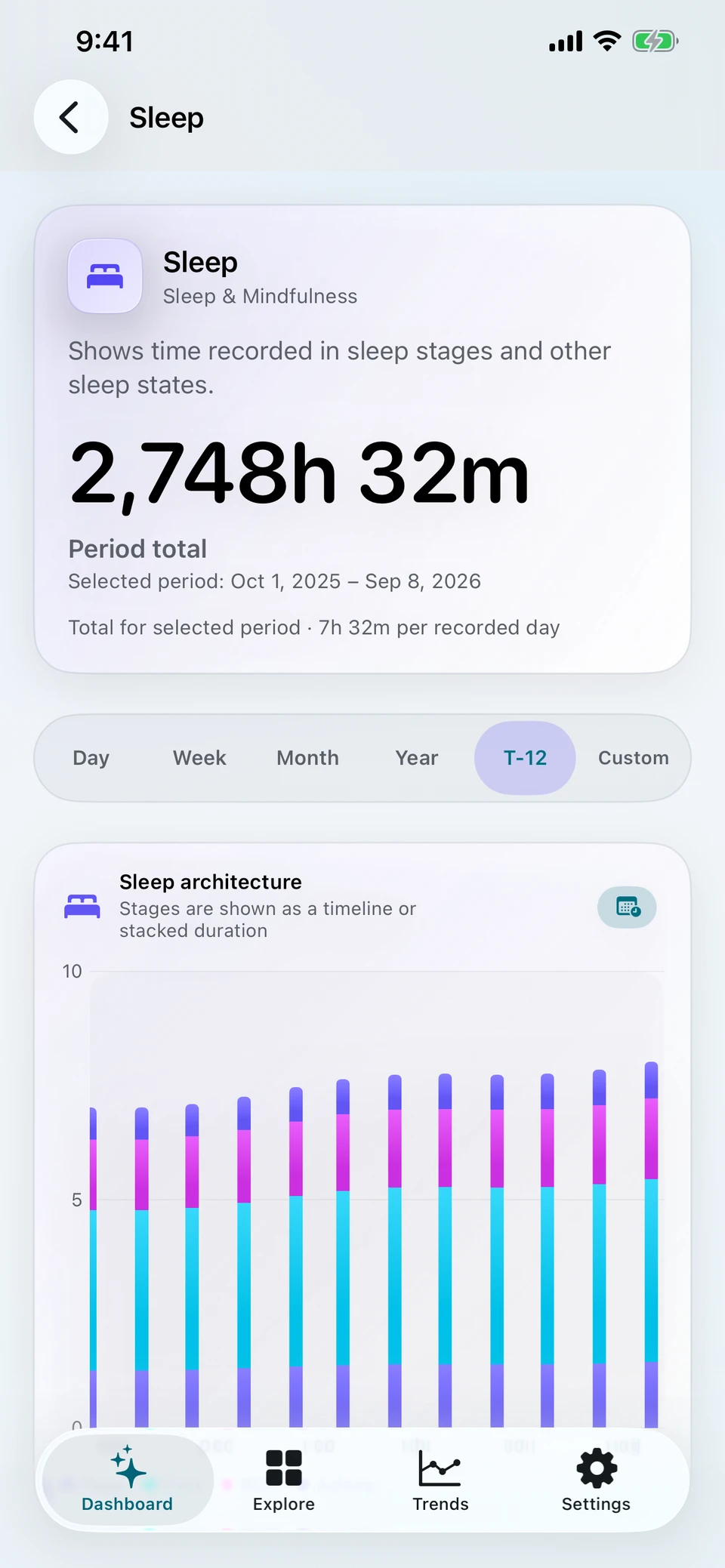
Metriweave 2.5 Sleep detail showing the trailing 12-month total and recorded sleep stages. Pro view.
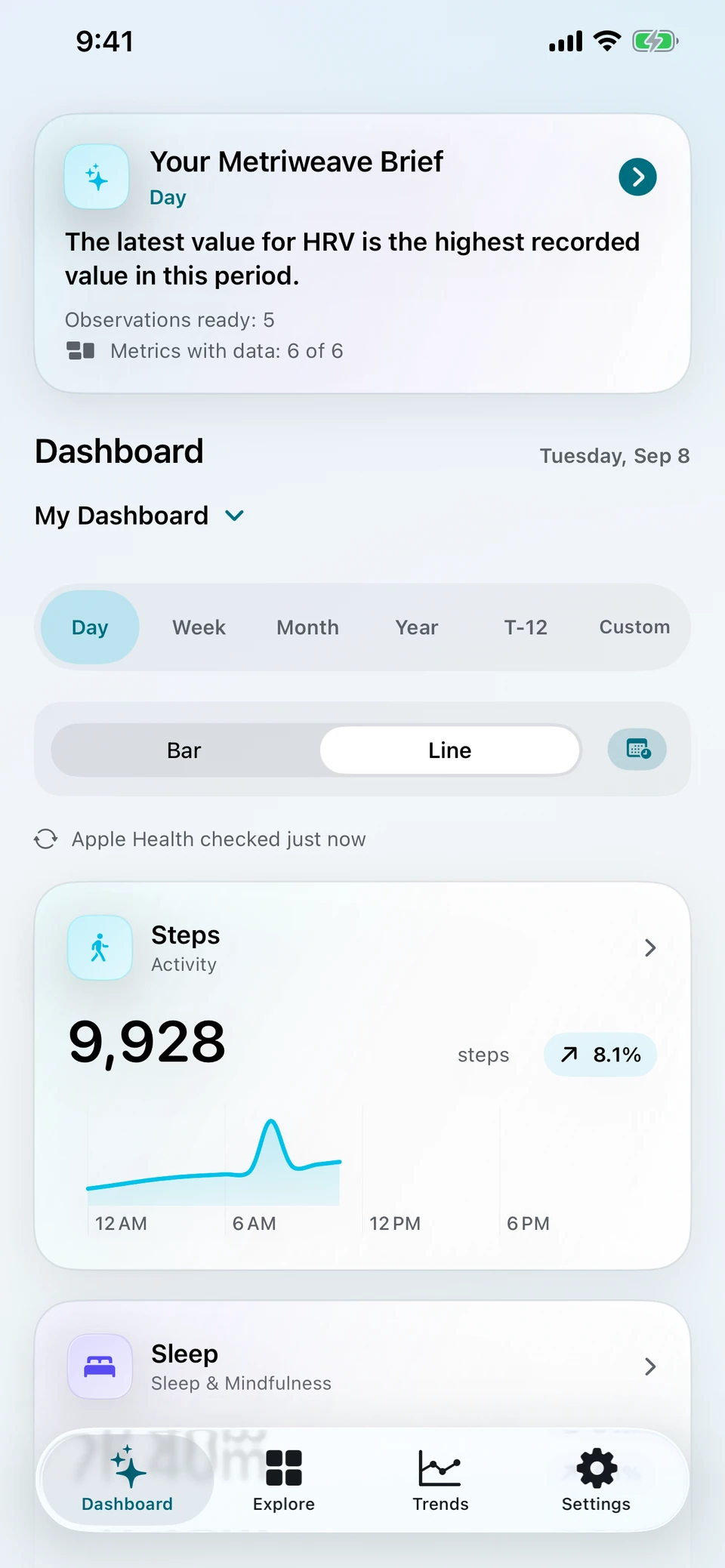
Metriweave Dashboard showing activity and sleep cards in the Day view.
Actual app screens · Demonstration data · Some features require Pro
Built around your Apple Health dataNo Metriweave account to createFor iPhone and iPad

A closer look

The details matter.
So does the bigger picture.

Start with your dashboard. Follow a measurement, compare your history, or bring a question to your chart. Choose a view to look inside.

Choose an app feature to preview

Your dashboard

Built around
what you follow.

Bring steps, sleep, heart measurements and other supported records together. Choose individual measurements or start with one of 16 dashboard presets.

  • Choose your cards in Explore.
  • Check the current day, week or month for free.
  • Open a card to see the details behind it.

Free includes six cards. Pro adds unlimited cards, longer history, layout controls and more customization.

Dashboard screenshot showing six selected measurements, a Steps chart and a Sleep card.

Sleep, in detail PRO VIEW

Give last night
some context.

Explore recorded sleep stages, follow your nightly totals and look across longer periods. See what your sources recorded, with clear labels for the selected view.

  • Inspect available REM, Core, Deep and Awake stages.
  • Explore recorded nights across a week or month.
  • With Pro, look back over longer sleep history.

Stage detail depends on your available Health records and requires Pro. The app does not score your sleep or diagnose a sleep condition.

Metriweave 2.5 Sleep detail showing the trailing 12-month total and recorded sleep stages. Pro view.

Sources & coverage PRO FILTERING

Know where
the number came from.

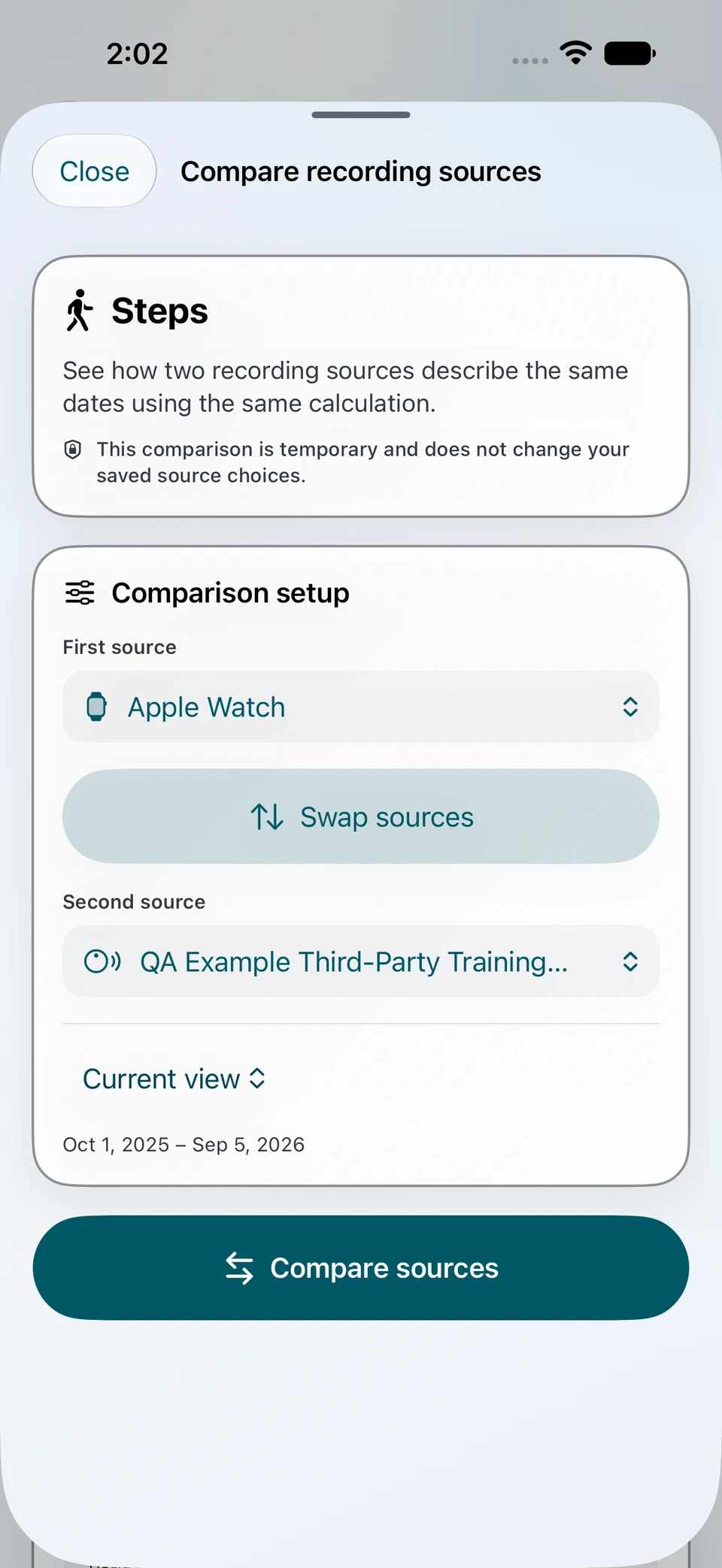
Your Apple Watch, iPhone and connected apps can all contribute to Apple Health. See which sources are behind a measurement before you compare it.

  • See the apps and devices contributing readings.
  • Check for gaps in the selected period.
  • With Pro, choose which sources to include.

Source choices apply across Dashboard and Trends. Available records depend on your Health access and connected apps or devices.

Metriweave 2.5 recording-source comparison with Apple Watch and an example third-party source. Demonstration data; Pro view.

Explain AI Coming soon · 2.5

Your charts.
Your questions.

Ask about the chart you’re viewing, with Apple Intelligence on your device. Follow your curiosity with a question in your own words.

  • Ask about the values, dates and units on your chart.
  • Ask a follow-up, or ask about another supported measurement you have already shared.
  • Keep the conversation on your device.

Requires Metriweave Pro and a compatible iPhone or iPad running iOS 27 or iPadOS 27 or later, with Apple Intelligence enabled and ready. Language support varies. AI responses can be mistaken.

Explain AI answering questions about resting heart rate in the actual Metriweave app.
Genuine Apple Intelligence response · Demonstration data

Compare measurements Coming soon · 2.5

More measurements.
One shared timeline.

Explore two to four measurements over the same periods. Put sleep beside steps, or choose another combination you want to understand.

  • Line up supported measurements over the same dates.
  • Read each one in its own units and scale.
  • Explore how their patterns change together.

Requires Metriweave Pro. Available for supported numeric measurements. Patterns can give you questions to explore; they do not establish cause and effect.

Metriweave Compare with Steps, Sleep and Resting HR on aligned charts.
Actual 2.5 app screen · Demonstration data

Life Events Coming soon · 2.5

Life happens
between the readings.

Add travel, illness or changes in routine to put your charts in context. Keep the moments you want to remember alongside the data you follow.

  • Add your own events and notes.
  • See event markers on your charts.
  • Keep event content encrypted on your device.

Life Events do not change chart calculations. Event content stays on the device where you create it and does not sync through iCloud.

Example events and feature illustration · Coming in 2.5

Health Reports Coming soon · 2.5

Take the useful parts
with you.

Build a report around the measurements, dates and sources you choose. Create a PDF for your own records or a conversation you want to prepare for.

  • Choose measurements, sources and the report layout.
  • Use separate date ranges for charts and detailed readings.
  • Preview, save or print the PDF with Pro.

Reports are prepared on your device. Creating and exporting a PDF requires Metriweave Pro. You choose whether and how to share it.

Metriweave Health Report preview with a fictional Steps chart and Print Report and Save PDF controls.
Actual 2.5 report preview · Fictional sample records
Watch the app in action 28-second walkthroughComing soon · 2.5

From your dashboard
to the bigger picture.

Watch a dashboard scroll, explore a resting heart rate chart across twelve months, and compare measurements over the same dates.

Recorded in Metriweave 2.5 with demonstration data. Pro is required for longer history and Compare. The video has music, on-screen captions and no spoken narration.

Use the player controls to start, pause or mute. It never plays automatically.

Video description: The app shows a dashboard with measurement cards, opens Resting Heart Rate and switches to a trailing twelve-month chart, then shows Compare with aligned Steps, Sleep and Resting HR charts. A selected period is inspected across the measurements. All readings are fictional.

App screens use demonstration data. Life Events uses an illustration. Features labeled “Coming soon · 2.5” are not yet available; your readings and available measurements will differ.

A view that fits your life

Follow what matters to you.

A sleep-focused week. A new exercise routine. Your everyday check-in. Give each a place, and find a useful starting point when you open the app.

Saved Dashboards Coming soon · 2.5

Keep a dashboard
for each interest.

Save one view for sleep, another for activity, and another for everyday wellness. Pro adds up to ten named dashboards, so you can return to the measurements you chose.

Your current dashboard remains saved. Existing dashboards are retained if Pro ends.

About Saved Dashboards
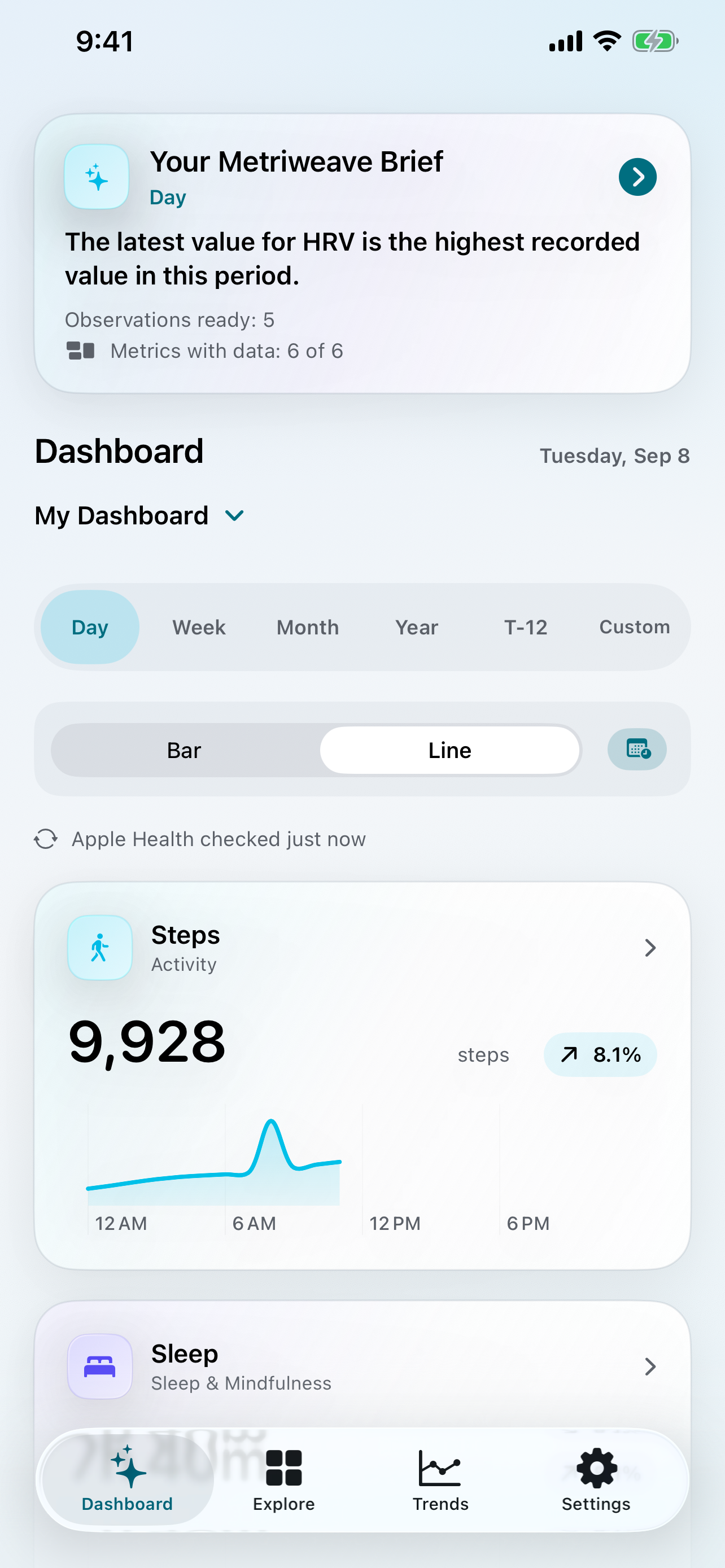
Metriweave 2.5 dashboard showing the My Dashboard selector and Steps card.
Dashboard selector · Demonstration data

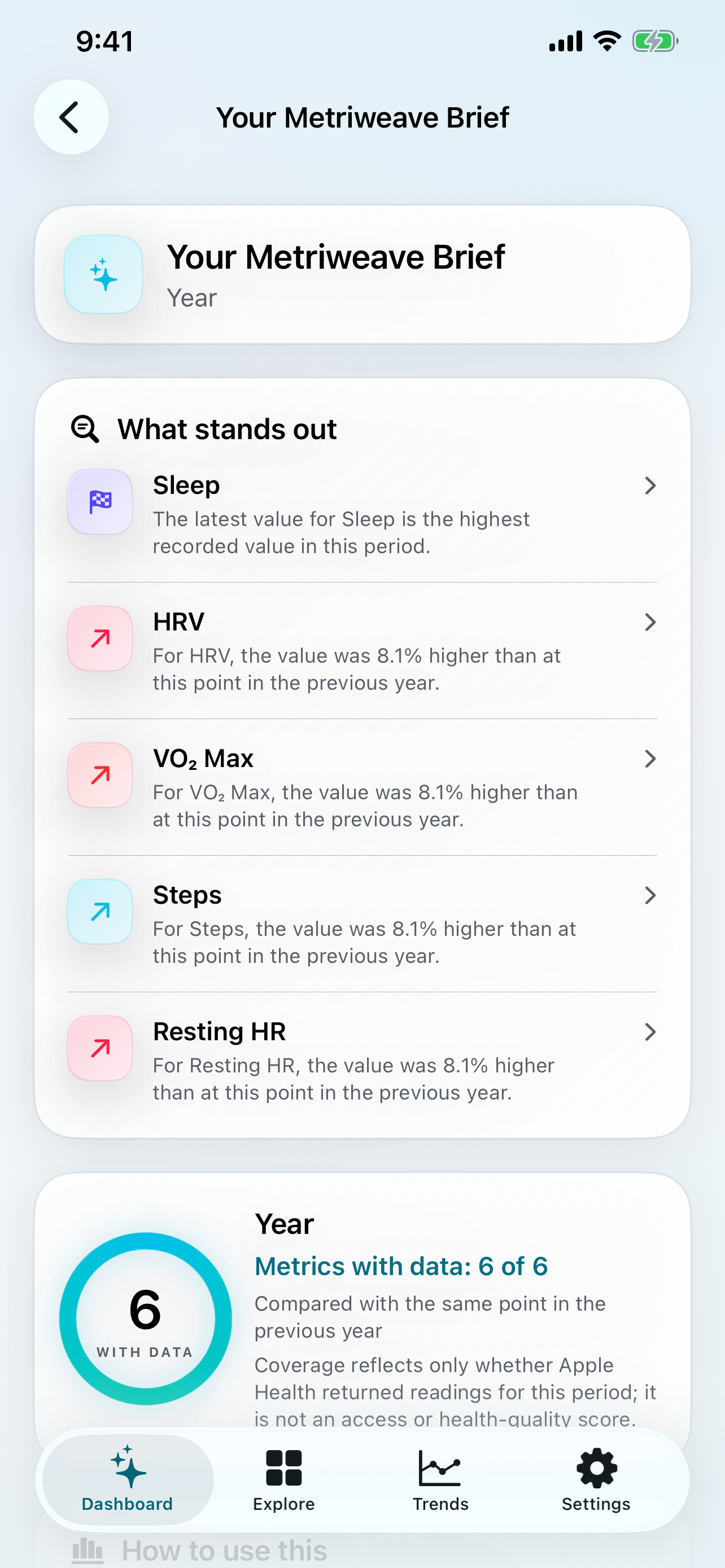
Your Metriweave Brief Coming soon · 2.5

A useful place
to start looking.

Find a small selection of observations for your dashboard period. Open one to see its supporting chart and explore the history behind it.

The Brief uses recorded-data patterns and coverage. It does not label changes as good or bad.

How your Brief works
Your Metriweave Brief showing observations linked to supported measurements.
Actual 2.5 app screen · Demonstration data

Get to know your history

There’s more than one
way to spot a pattern.

Explore the rhythm of a day, a stretch of months, or a question that brings several measurements together.

Daily Rhythm Coming soon · 2.5

When does your day get moving?

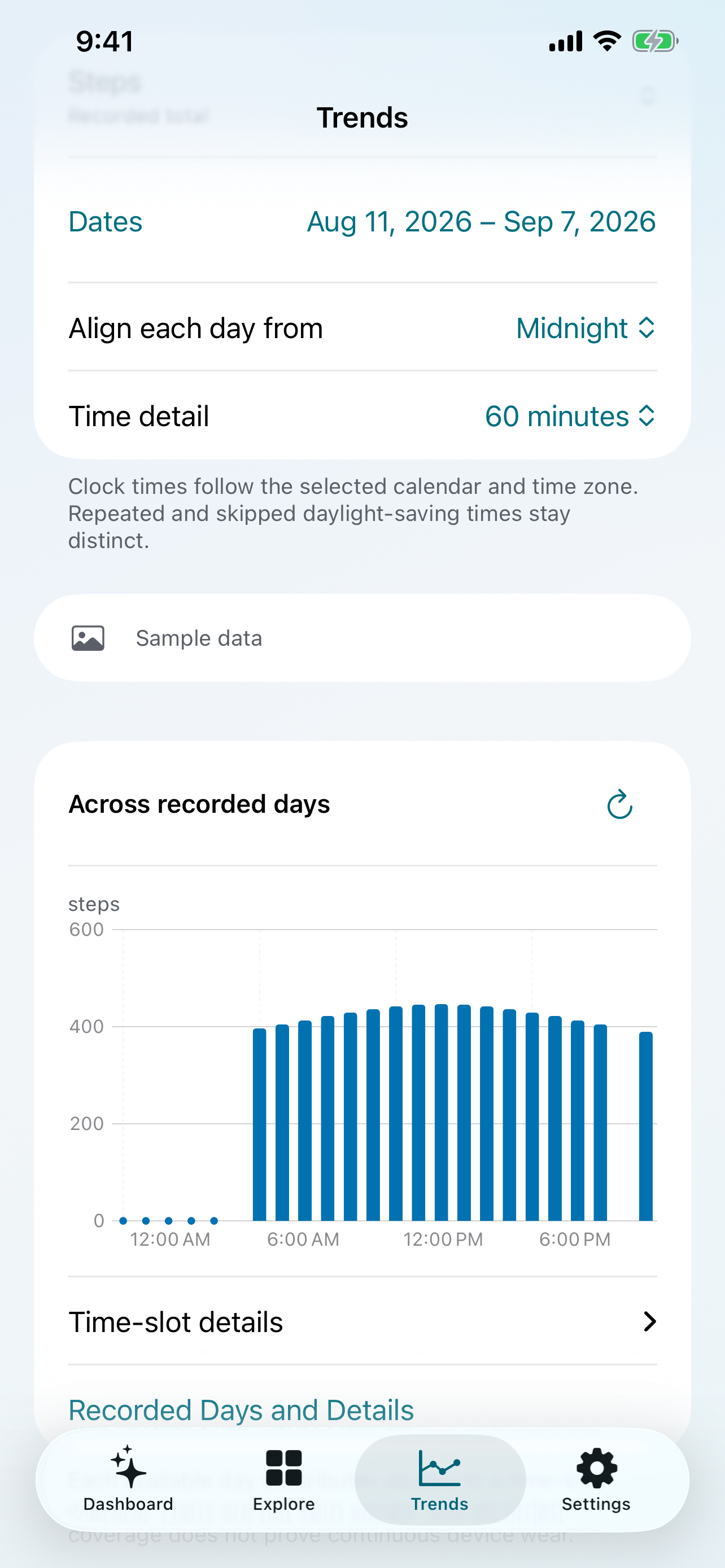
Explore when readings are recorded across your days. Use clock time or recorded sleep to look at the timing of a routine.

Requires Pro and measurements with usable timing detail.

Explore Daily Rhythm
Daily Rhythm chart showing recorded Steps by time of day.
Actual 2.5 app screen · Demonstration data

Health Chapters Coming soon · 2.5

See the stretches between changes.

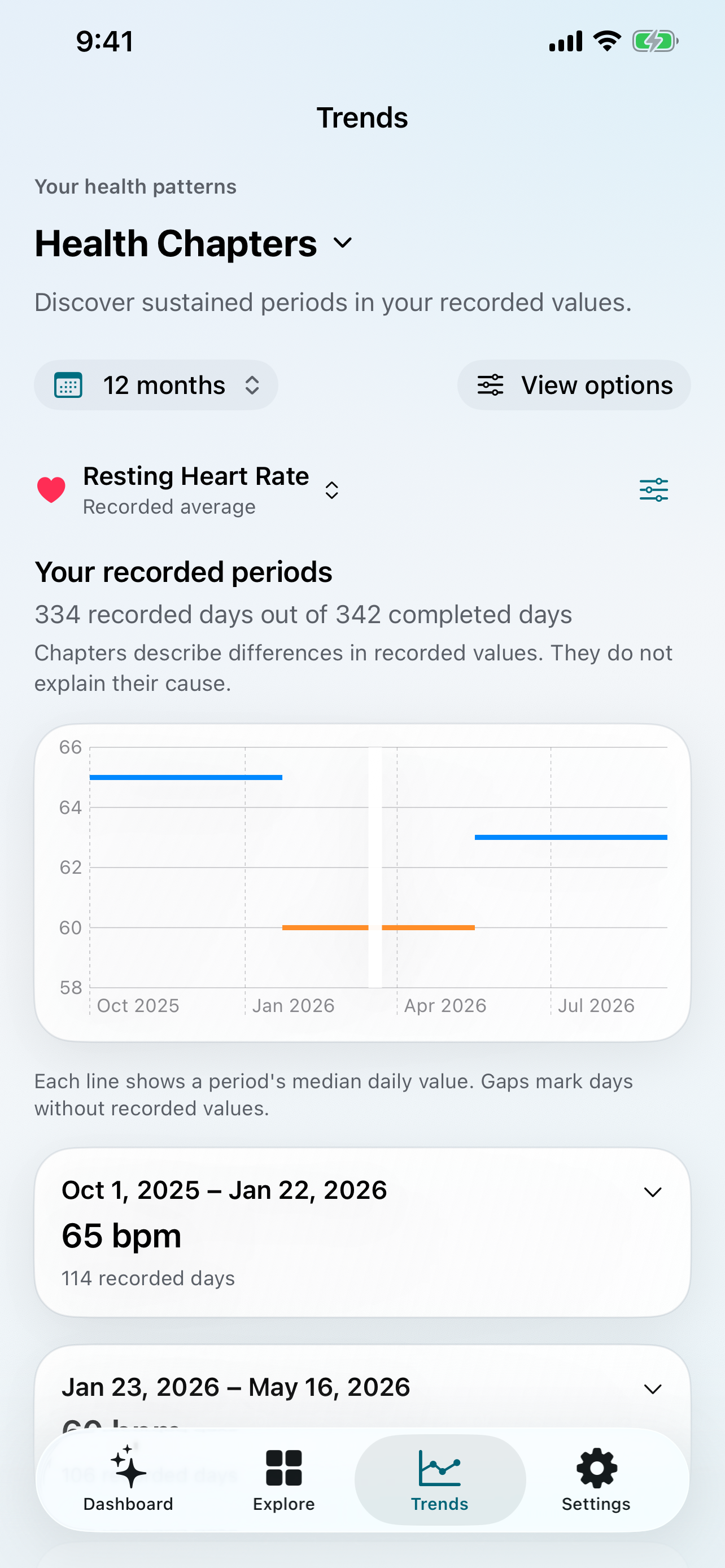
Find sustained periods in your recorded values. Inspect their dates and coverage, with gaps visible alongside the history.

Requires Pro. Chapters describe recorded values, not the cause of a change.

Explore Health Chapters
Health Chapters showing sustained periods of resting heart rate and a recorded-data gap.
Actual 2.5 app screen · Demonstration data

Pattern Search Coming soon · 2.5

Find the days that fit your question.

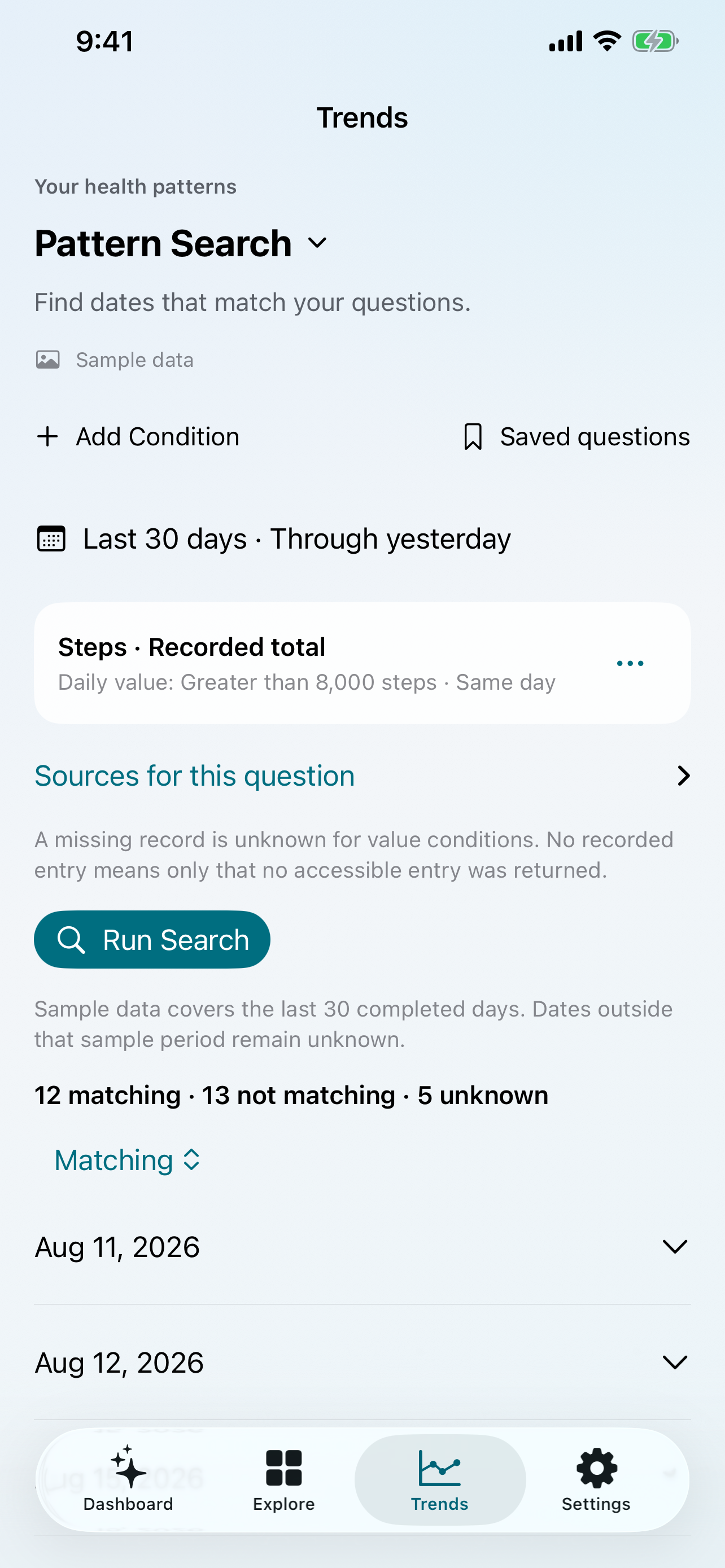
Look for dates matching conditions across measurements. Save a question you want to revisit, then review it before running it again.

Requires Pro. Missing records remain unknown.

Explore Pattern Search
Pattern Search with a sample Steps condition and matching, non-matching and unknown dates.
Actual 2.5 app screen · Demonstration data

Personal Seasons Coming soon · 2.5

How does this year compare?

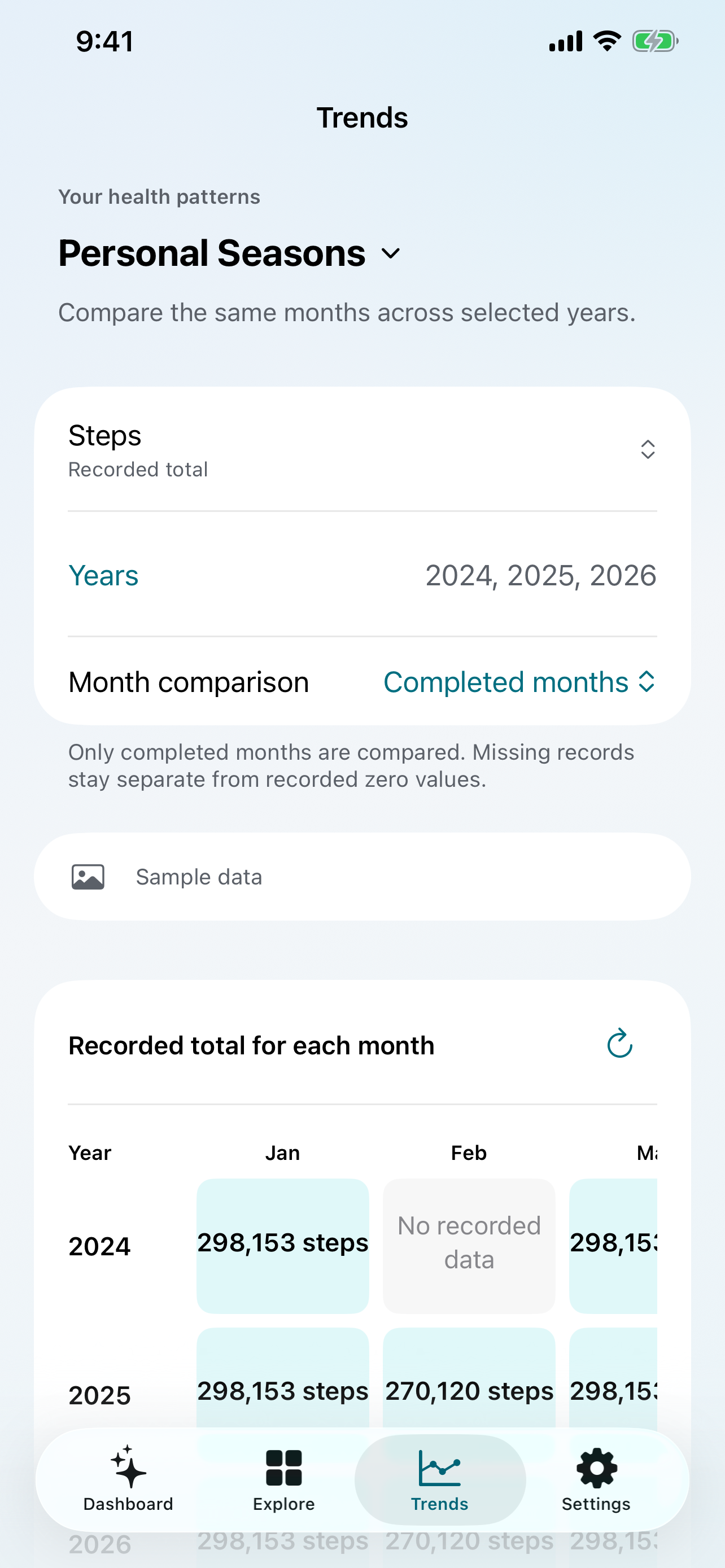
Explore the same months across years. Look back at your recorded activity each summer, or compare matching elapsed days as a month unfolds.

Requires Pro. Missing records and source changes stay visible.

Explore Personal Seasons
Personal Seasons comparing monthly Steps records across 2024, 2025 and 2026.
Actual 2.5 app screen · Demonstration data

Clarity behind every chart

Know what’s behind
the number.

See which apps and devices contribute readings, and where the selected period has gaps.

With Pro, choose which sources contribute to each measurement across Dashboard and Trends. Your source choices are visible, so you can check what you are comparing.

How sources work
Metriweave 2.5 recording-source comparison with Apple Watch and an example third-party source. Demonstration data; Pro view.
Recording-source comparison · Demonstration data.

Privacy, by design

Your Health data.
Not our database.

Metriweave processes Health measurements on your device. Your Health records are not uploaded to a Boxcue database.

Read the privacy policy

No account to create

Open the app and choose your Health access. There is no Metriweave account or password to manage.

No Health data sold for advertising

Metriweave does not sell Health data or use it for advertising.

Preferences are separate from readings

Metriweave can sync app preferences through iCloud. Compact summaries support widgets and your paired Apple Watch; Apple’s own Health sync is separate.

Start with what you need

Start free.
Go further with Pro.

Get a feel for your dashboard first. Unlock more history and more ways to explore when you want them.

Metriweave

Your everyday starting point.

  • Up to six dashboard cards
  • Current Day, Week and Month views
  • Small Home Screen widget
  • Unit preferences and Enhanced chart contrast
Get started free

Metriweave Pro

More history. More ways to explore.

  • Unlimited dashboard cards and more layout choices
  • Year, T-12, earlier periods and custom dates
  • Comparisons, Trends and personal baselines
  • Individual source filtering
  • More widgets, Apple Watch and supported complications
  • Up to ten named saved dashboards Coming soon · 2.5
  • Multi-metric Compare and Health Reports Coming soon · 2.5
  • Daily Rhythm, Health Chapters, Pattern Search and Personal Seasons Coming soon · 2.5
  • On-device Explain AI Coming soon · 2.5
Explore what Pro includes

Current prices, plans and eligible offers appear in the app before purchase. See current US plans and introductory offers. Features labeled “Coming soon · 2.5” arrive with that update. Explain AI also requires a compatible iPhone or iPad running iOS 27 or iPadOS 27 or later, with Apple Intelligence enabled and ready. Language support varies. Available measurements depend on your Health records and access choices.

More ways to read your data.

Explore supported charts with VoiceOver, larger text and stronger contrast. Metriweave also responds to supported reduced-motion and display preferences.

Explore accessibility

Available now on the App Store

See your Health data
in a new light.

Make room for the measurements that matter to you.

Download Metriweave Free to download. Optional Pro purchases in the app.